Contract & Strike Time-series
🚨 Important:SF_OPTIONS_PRO() requires an active Options subscription. If you don't have an active subscription, upgrade on our Pricing page.
Use this workflow when you want to follow options data over time instead of reviewing a single snapshot. You can track one specific contract with a fully qualified OCC symbol, or track a strike over time with an underlying ticker together with dataType, expirationDate, and strike.
For a complete function overview, parameter guide, and dataset map, see Options.
=SF_OPTIONS_PRO(symbol, dataType, expirationDate, strike, tradeDate, endDate, metrics, options)symbolis either a fully specified OCC symbol such as"AAPL251219C00200000"or an underlying symbol such as"AAPL".dataTypecan be left blank when using a contract symbol, or set to"calls","puts", or"calls&puts"when searching by underlying symbol.expirationDatecan be left blank when using an OCC symbol, or set explicitly when searching by underlying symbol.strikecan be left blank when using an OCC symbol, or set explicitly when searching by underlying symbol.tradeDatesets the historical start date.endDatesets the historical end date.metricsselects the contract fields to return. Leave blank or use"all"to display the full dataset.optionsallows additional request or output options to be chained together with&.
Parameters
Symbol (symbol)
Use either an underlying ticker such as "AAPL" or a fully qualified OCC contract symbol such as "AAPL251219C00200000". A fully qualified OCC symbol already includes the underlying, expiration date, option type, and strike, so it is the cleanest way to build a single-contract time-series request.
Data Type (dataType)
If you use an OCC symbol, dataType can be left blank because SheetsFinance can infer it automatically. If you use an underlying ticker instead, set dataType to "calls" or "puts" for a single side, or "calls&puts" when you want both sides of the same strike over time.
Expiration Date (expirationDate)
If you use an OCC symbol, expirationDate can be left blank because it is embedded in the contract symbol. If you use an underlying ticker, set expirationDate in YYYY-MM-DD format or as an Excel date serial. You do not need to match the exact listed expiry perfectly because the function will use the date entered or the next upcoming expiration date immediately after it.
Strike (strike)
If you use an OCC symbol, strike can be left blank because it is embedded in the contract symbol. If you use an underlying ticker, set strike explicitly to identify the exact contract or strike you want to track. When you combine strike with dataType="calls&puts", the function can return both sides of that strike over time.
Trade Date (tradeDate)
tradeDate is the historical moment-in-time date for the first row in the series. When you also supply endDate, it acts as the start date for the contract time-series range.
End Date (endDate)
endDate sets the end of the historical contract time-series and must be after tradeDate.
Metrics (metrics)
The available contract time-series metrics are:
All (
"all")Contract Symbol (
"contractSymbol")Strike (
"strike")Type (
"type")Value (
"value")Mid (
"mid")Prev Close Value (
"prevClose")Value Change (
"change")Value Percent Change (
"percentChange")Volume (
"volume")Open Interest (
"openInterest")Volume/OI Ratio (
"volumeOIRatio")Bid (
"bidPrice")Bid Size (
"bidSize")Ask (
"askPrice")Ask Size (
"askSize")Implied Volatility (
"impliedVolatility")Delta (
"delta")Gamma (
"gamma")Theta (
"theta")Vega (
"vega")Rho (
"rho")Phi (
"phi")Driftless Theta (
"driftlessTheta")Bid IV (
"bidIv")Ask IV (
"askIv")Ext Value (
"extValue")Residual Rate (
"residualRate")SMV Vol (
"smvVol")Ext SMV Vol (
"extSmvVol")In The Money (
"inTheMoney")Underlying Symbol (
"underlyingSymbol")Stock Price (
"stockPrice")Spot Price (
"spotPrice")Expiration Date (
"expirDate")Expiry Time of Day (
"expiryTod")DTE (
"dte")Trade Date (
"tradeDate")Quote Date (
"quoteDate")Snapshot Date (
"snapShotDate")Snapshot Estimated Time (
"snapShotEstTime")Updated (
"updatedAt")
Options (options)
Use options for output formatting or request modifiers. Chain multiple options together with &.
Formatting options:
"NH"removes the header row."-"reverses the output order.
Value display options:
"changeType=mid"calculates change values using the mid price."changeType=value"calculates change values using the contract value.
Range filters:
"range=ntm""range=20ntm""range=50ntm"
Output grouping:
Default output grouping is by strike (with calls and puts interleaved when both are returned), but you can also group by type, expiration, or trade date.
"groupBy=type"splits"calls&puts"output into calls first and then puts."groupBy=expiration""groupBy=tradeDate"
Examples
Example 1 - Build a contract time-series using underlying, expiry, and strike with most recent date last
=SF_OPTIONS_PRO("AAPL", "puts", "2026-06-18", 240, "2026-03-01", "2026-04-06", "tradeDate&contractSymbol&mid&value&volume&impliedVolatility&delta&theta&vega&stockPrice", "-")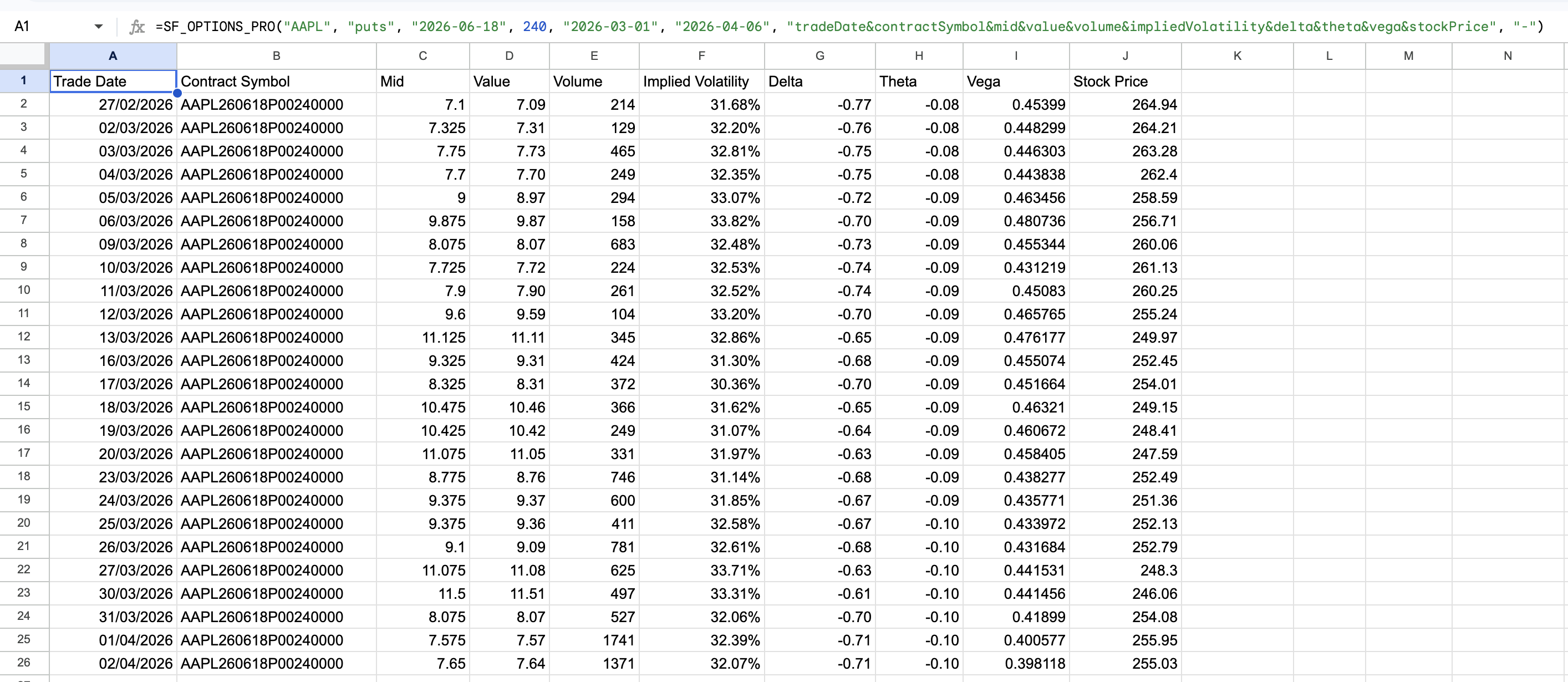
Example 2 - Track both sides of one strike over time, most recent date first
=SF_OPTIONS_PRO("AAPL", "calls&puts", "2026-06-18", 260, "2026-03-01", "2026-04-06", "tradeDate&contractSymbol&type&value&volume&impliedVolatility&delta&stockPrice")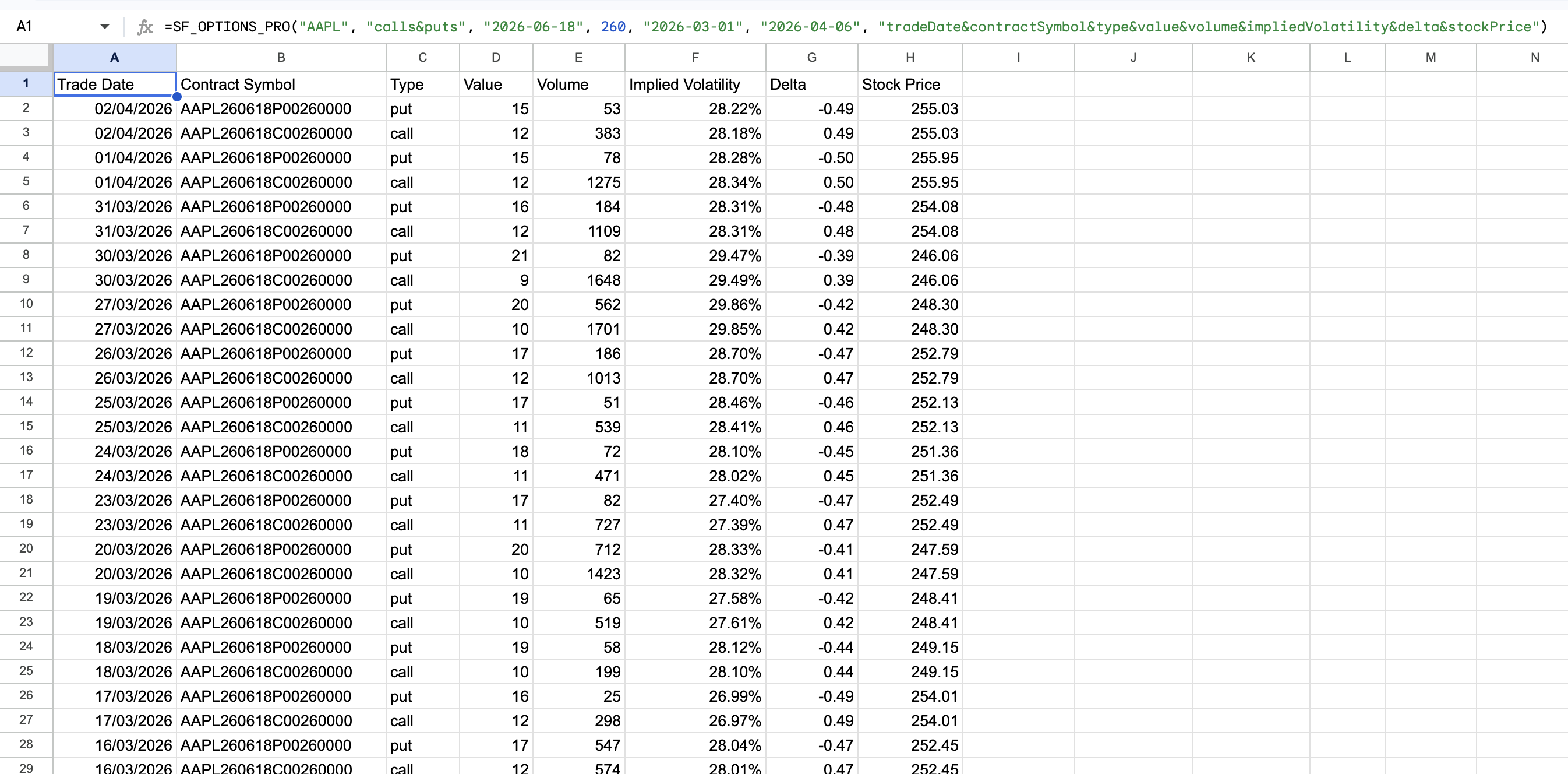
Example 3 - Split the same strike time-series into calls first, then puts
=SF_OPTIONS_PRO("AAPL", "calls&puts", "2026-06-18", 260, "2026-03-01", "2026-04-06", "tradeDate&contractSymbol&type&value&volume&impliedVolatility&delta&stockPrice", "groupBy=type")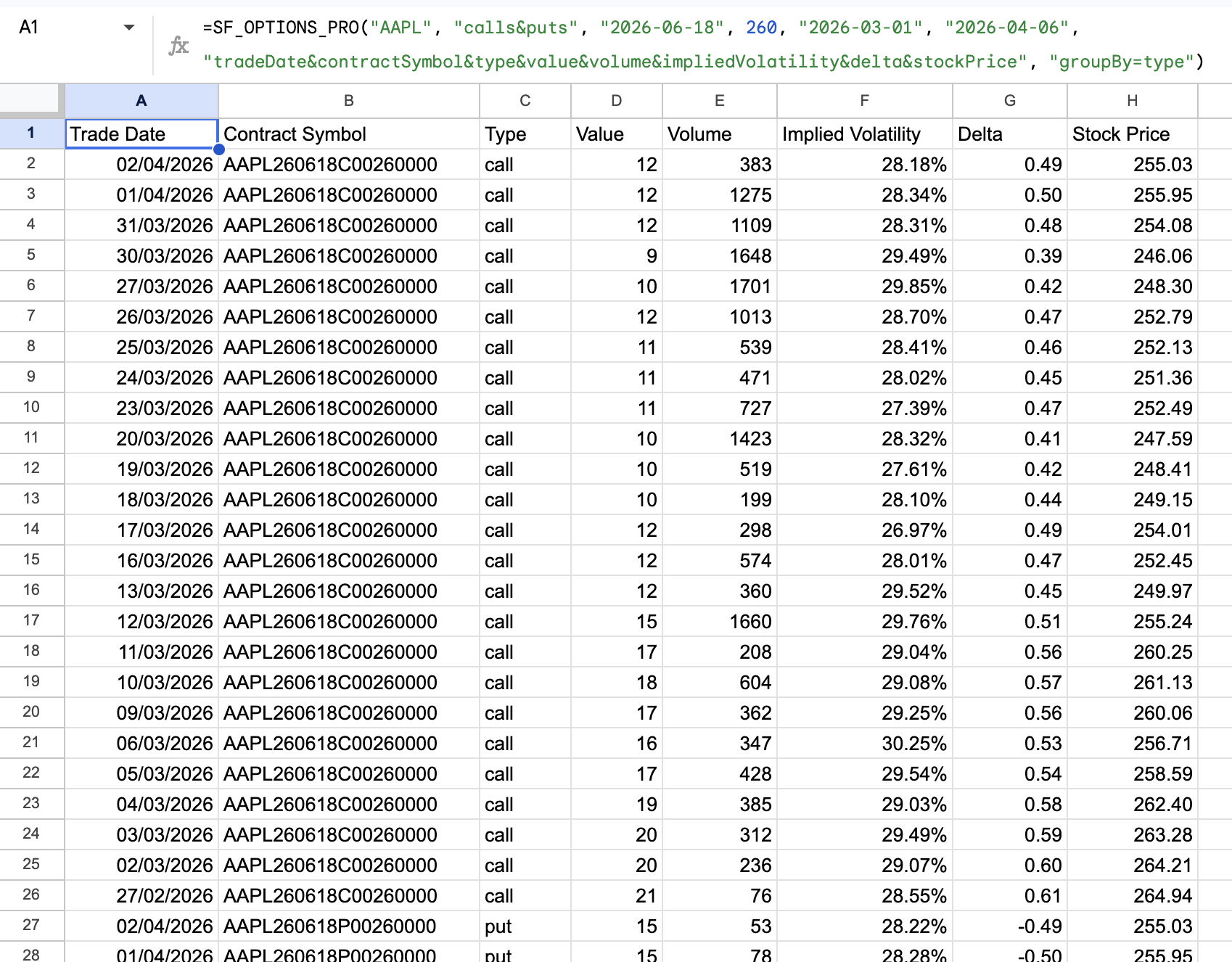
Example 4 - Track fully specified OCC contract over time
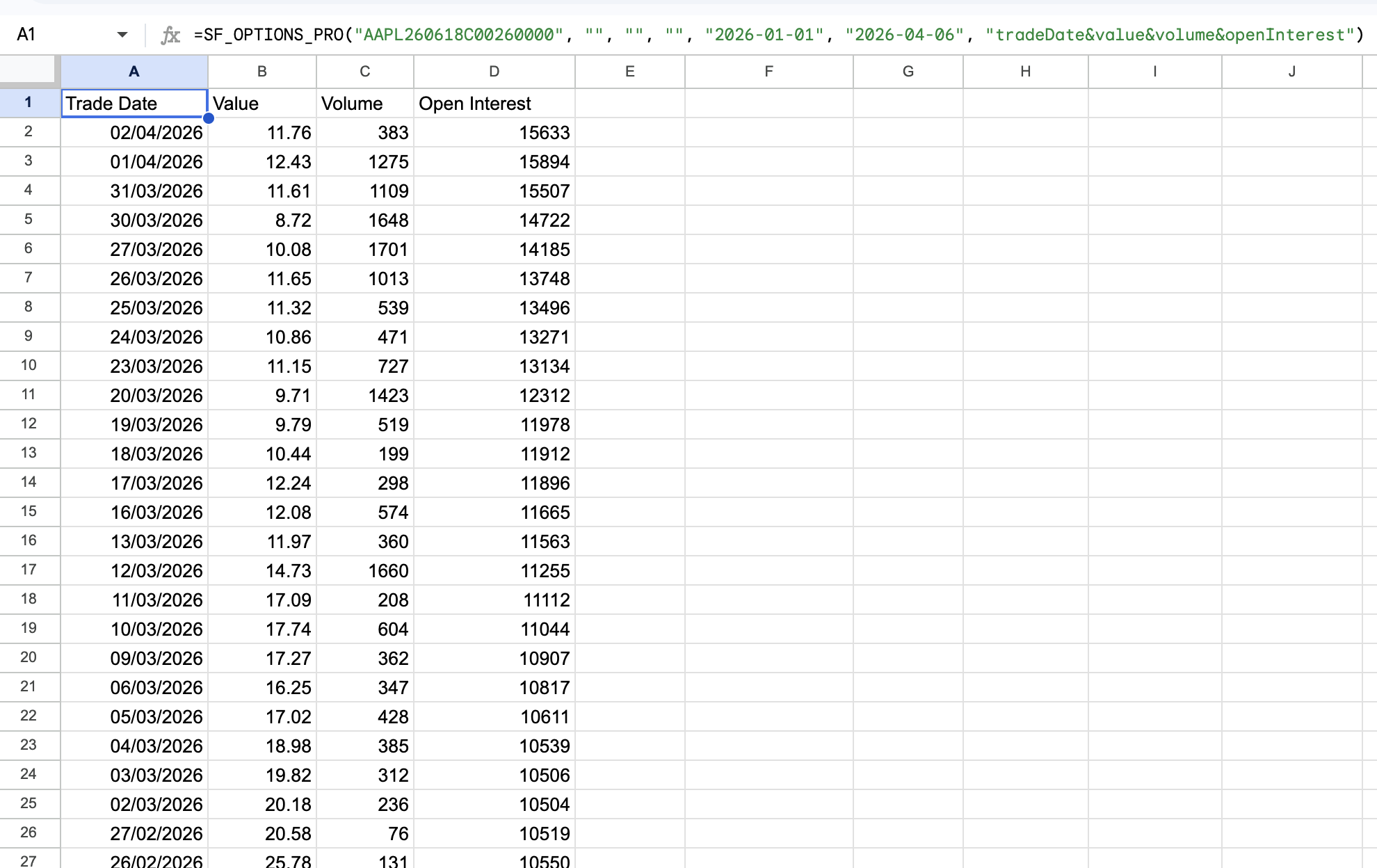
=SF_OPTIONS_PRO("AAPL260618C00260000", "", "", "", "2026-01-01", "2026-04-06", "tradeDate&value&volume&openInterest")