IV Rank Batch
🚨 Important:SF_OPTIONS_PRO() requires an active Options subscription. If you don't have an active subscription, upgrade on our Pricing page.
"ivRank" is the only SF_OPTIONS_PRO()dataType that supports a range of symbols. This makes it ideal for watchlists, scanners, and comparing relative IV conditions across multiple underlyings in one call.
For a complete function overview, parameter guide, and dataset map, see Options.
Batching "ivRank" can only provide current or historical snapshots across a symbol range with tradeDate. If you want to pull a historical time-series for a single symbol, see IV Rank Time-series.
=SF_OPTIONS_PRO(symbol, "ivRank", "", "", tradeDate, "", metrics, options)symbolis a range of cells containing ticker symbols, for exampleA2:A20.dataTypemust be"ivRank".tradeDateis optional and requests historical IV rank data when supplied. UseYYYY-MM-DDformat, an Excel date serial or Google Sheets date formatted cell.endDateNot available for batch requests.metricsselects which IV rank fields to return. Leave blank or use"all"to output the full dataset.optionsallows additional request or output options to be chained together with&.
Parameters
Symbol (symbol)
Use a range of cells containing ticker symbols, such as A2:A20 or A2:A50. SheetsFinance will return the same IV Rank fields for every symbol in that range in one request.
Data Type (dataType)
Must be set to "ivRank".
Trade Date (tradeDate)
tradeDate is the historical moment-in-time date for the batch snapshot. Use YYYY-MM-DD format, an Excel date serial or Google Sheets date formatted cell. If omitted, the function returns the current batch IV rank snapshot.
Metrics (metrics)
The available batch IV rank metrics are:
All (
"all")Ticker (
"ticker")Trade Date (
"tradeDate")IV (30 Days) (
"iv")IV Rank 1M (
"ivRank1m")IV Percentile 1M (
"ivPct1m")IV Rank 1Y (
"ivRank1y")IV Percentile 1Y (
"ivPct1y")Updated At (
"updatedAt")
Options (options)
Use options for output formatting modifiers. Chain multiple options together with &.
Formatting options:
"NH"removes the header row."-"reverses the output order.
Examples
Example 1 - Pull current IV rank values for a watchlist
=SF_OPTIONS_PRO(A2:A12, "ivRank", "", "", "", "", "tradeDate&iv&ivRank1m&ivPct1m&ivRank1y&ivPct1y")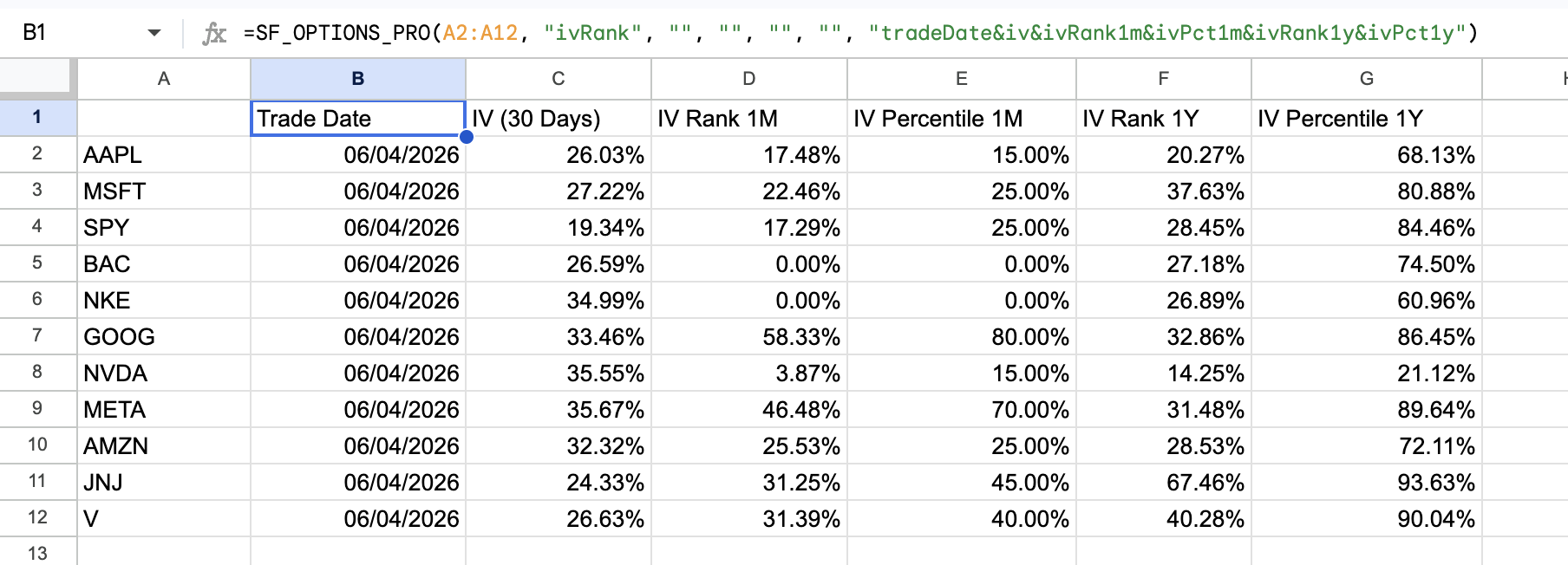
Example 2 - Pull historical IV rank values for a watchlist on a specific date with selected metrics
=SF_OPTIONS_PRO(A2:A12, "ivRank", "", "", "2026-02-03", "", "tradeDate&ivRank1m&ivPct1m&ivRank1y&ivPct1y")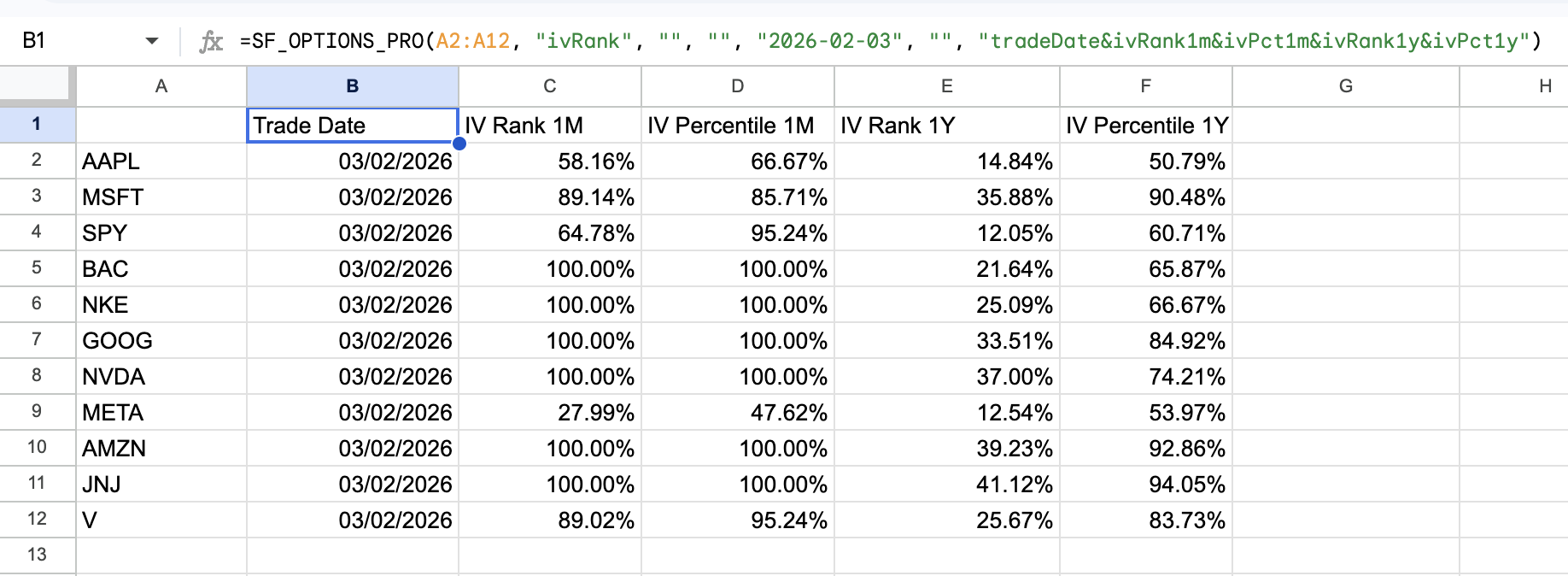
Example 3 - Remove the header row from the data
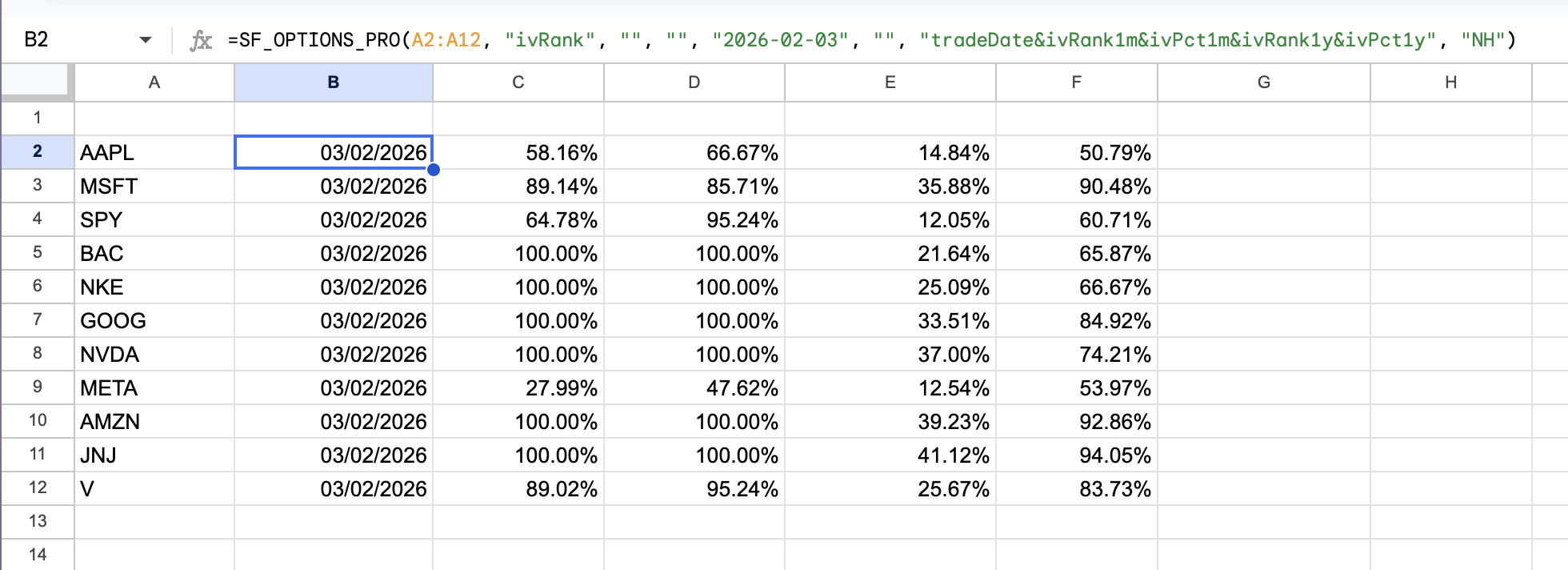
When removing the header with "NH" be sure to place your formula inline with your first symbol so that the data aligns correctly. In this example, the formula is in B2 next to the first ticker in A2:A12. Whereas if the header were included, you would place the formula one row above the first ticker in A1 so that the header aligns with the correct fields.
=SF_OPTIONS_PRO(A2:A12, "ivRank", "", "", "2026-02-03", "", "tradeDate&ivRank1m&ivPct1m&ivRank1y&ivPct1y", "NH")