
Company Info
The profile data type is used to deliver an overview of non-real time company information. This includes things like the company name, sector, exchange, market cap, etc. This data type was formerly called companyInfo; existing formulas using "companyInfo" continue to work.
=SF(symbol, "profile", metric, "", options)symbolis the ticker symbol of the financial asset (e.g.,"AAPL"). You can use our Symbol Search to find the correct ticker symbol. Check out the Company Info Batch function to run this over 1000s of symbols at once.metricselects what metric(s) to display (see options below), display all metrics by using"all". Chain together as many metrics as you'd like using the&operator, e.g.,"name&exchange§or".optionsadjusts the formatting of the output. There is currently only one available option for company info data. You can set this field to"NH"for no header row when outputting multi-cell data.
Suggestion: If you're after a large amount of company info data at once (e.g. in a watchlist or portfolio) consider using our Company Info Batch functionality.
The company info function has the following available metrics:
All (
"all")Name (
"name")Stock Exchange Symbol (
"exchange")Stock Exchange Full Name (
"exchangeFullName")Price Range (
"range")Last Dividend (
"lastDividend")Dividend Yield (
"divYield")Beta (
"beta")Market Cap (
"marketCap")Reporting Currency (
"currency")Industry (
"industry")Sector (
"sector")Country (
"country")State (
"state")City (
"city")ZIP Code (
"zip")Phone Number (
"phone")ISIN (
"isin")CUSIP (
"cusip")CIK (
"cik")Full-time Employees (
"fullTimeEmployees")IPO Date (
"ipoDate")CEO (
"ceo")Company Website (
"website")Company Summary (
"description")Is ETF (
"isEtf")Is ADR (
"isAdr")Is Fund (
"isFund")Is Actively Trading (
"isActivelyTrading")
Examples
Example 1 - Single metric (name)
Set the metric to "name" for the full name of the financial asset.
=SF("AAPL", "profile", "name")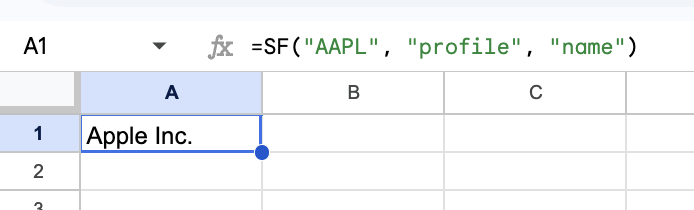
Example 2 - Single metric (Stock Exchange)
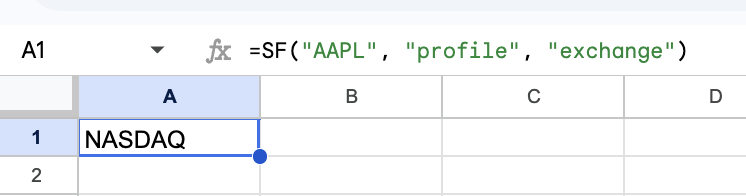
Set the metric to "exchange" for the exchange that asset is traded on.
=SF("AAPL", "profile", "exchange")Note: Returns CRYPTO for all cryptocurrencies, FOREX for forex pairs, INDEX for indexes, COMMODITY for commodities,
Example 3 - Multiple metrics
You can chain together multiple metrics using the & operator. This will return a multi-cell array with a header row included automatically. You can remove the header row by setting the options argument to "NH".
=SF("AAPL", "profile", "name&exchange§or")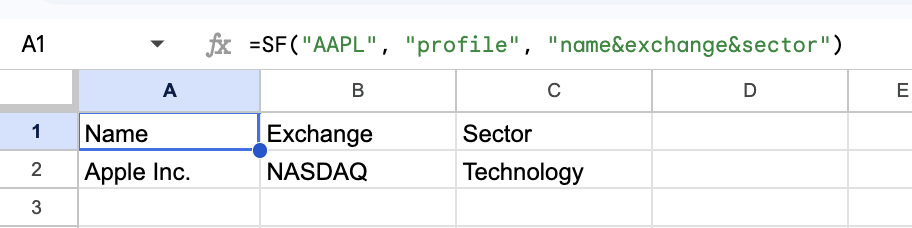
Example 4 - All metrics
Set the metric argument to "all" to return all available company info metrics.
=SF("AAPL", "profile", "all")