
Financial Calendars
Use the SF_CALENDAR() function to access a number of different financial calendars such as earnings, dividends, splits and macroeconomics. This function is also used for other date-based financial data, such as US Treasury Rates. This function will return multiple rows and columns depending on the date range supplied and the metrics requested. The function layout is as follows:
=SF_CALENDAR(searchTerms, type, startDate, endDate, metrics, options)searchTermsis a series of terms to filter the calendar results by. Multiple terms can be chained together with the&symbol. Leaving this blank applies no filtering to the calendar. You can also use the exact match operator$to ensure the search term is an exact match (i.e., $AAPL will only return results for the symbol AAPL, not AAPL.PA or AAPL.DE). You can combine both the&and$operators in the same search term (i.e., $AAPL&$GOOGL will return results for both AAPL and GOOGL, but not AAPL.PA or GOOGL.DE).typeis the type of calendar to generate. Available options are"earnings","dividends","splits","ipos","economic","treasury"and"financials".startDateis the start date for the calendar, written in iso format YYY-MM-DD, e.g."2000-04-03". The maximum range betweenstartDateandendDatefor one function call is 90 days. If the range is larger than this it will be truncated to 90 days.endDateis the end date for the calendar, written in iso format YYY-MM-DD, e.g."2019-12-24"metricselects what metrics to display. Leave blank or use"all"to display all metrics. Chain together metrics with&symbol to display more than one (e.g."date÷nd"). Metrics are specific to the calendar type, see the calendar type's documentation for more information.optionsadjusts the formatting of the output."-"reverses the default output order and"NH"removes the header on the output. These can be combined like so"-&NH".
IMPORTANT:
All calendars have a maximum range of 90 days per function call. If the range is larger than this it will be truncated to 90 days. If you'd like a calendar for a larger range, you can make multiple function calls with different date ranges, consider using in-built Google Sheets functions such as HSTACK() or VSTACK() to combine the results.
The
searchTermsargument does not have to be only exchanges/markets you can combine stock symbols, exchanges, and markets in the same search term. For example,AAPL&GOOGL&.NS&.DEwill return results for AAPL and GOOGL on the NSE and XETRA exchanges.The exact match operator
$can be used in thesearchTermsargument to ensure the search term is an exact match. For example,$AAPLwill only return results for the symbol AAPL, not AAPL.PA or AAPL.DE.To search for US and OTC markets without an exchange suffix user
".US".
The type parameter
There are 7 different types of calendars that can be generated using the SF_CALENDAR() function:
Earnings calendar (
"earnings")Dividends calendar (
"dividends")Splits calendar (
"splits")IPO calendar (
"ipos")Economic calendar (
"economic")US Treasury Rates (
"treasury") - This is a special case and does not require any search terms, more on this under US Treasury Rates.Financial Statement Updates (
"financials") - Shows when financial statements were added to the universe, more on this under Financial Statement Updates Calendar.
Earnings Calendar
The earnings calendar provides information on historic and upcoming earnings releases. The metrics available are:
Date (
"date")Symbol (
"symbol")EPS (
"eps")EPS Estimate (
"epsEstimated")Release Timing (
"time")Revenue (
"revenue")Revenue Estimate (
"revenueEstimated")Fiscal Date Ending (
"fiscalDateEnding")Updated (
"updatedFromDate")
Dividends Calendar
The dividends calendar provides information on historic and upcoming dividend payments. The metrics available are:
Date (
"date")Symbol (
"symbol")Dividend (
"dividend")Adjusted Dividend (
"adjDividend")Record Date (
"recordDate")Payment Date (
"paymentDate")Declaration Date (
"declarationDate")Yield (
"yield")Frequency (
"frequency")
Splits Calendar
The splits calendar provides information on historic and upcoming stock splits. The metrics available are:
Date (
"date")Symbol (
"symbol")Numerator (
"numerator")Denominator (
"denominator")Ratio (
"ratio")
IPO Calendar
The IPO calendar provides information on historic and upcoming initial public offerings (IPOs). The metrics available are:
Date (
"date")Symbol (
"symbol")Company (
"company")Exchange (
"exchange")Actions (
"actions")Shares (
"shares")Price Range (
"priceRange")Market Cap (
"marketCap")
Economic Calendar
The economic calendar provides information on historic and upcoming economic events. The metrics available are:
Date (
"date")Country (
"country")Event (
"event")Currency (
"currency")Previous (
"previous")Estimate (
"estimate")Actual (
"actual")Change (
"change")Change Percentage (
"changePercentage")Impact (
"impact")
Example 1 - Dividends Calendar, specific dates, filtering for Frankfurt Stock Exchange (using suffix ".DE")
=SF_CALENDAR(".DE", "dividends", "2024-03-01", "2024-06-01", "all")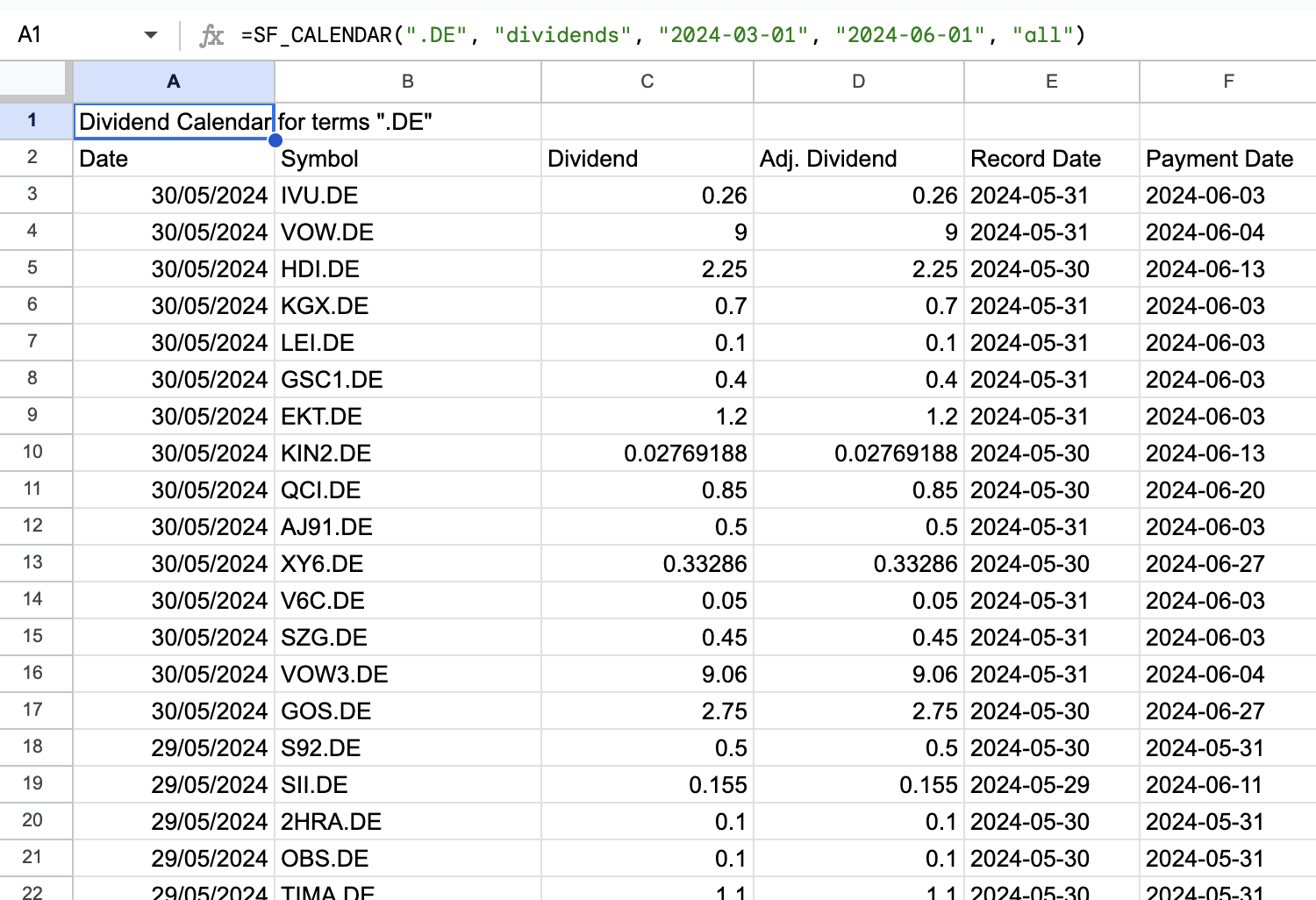
Example 2 - Splits Calendar, last 3 months, all metrics, filter for ASX and NSE (using suffix ".AX" and ".NS")
=SF_CALENDAR(".AX&.NS", "splits", today()-90, today(), "all")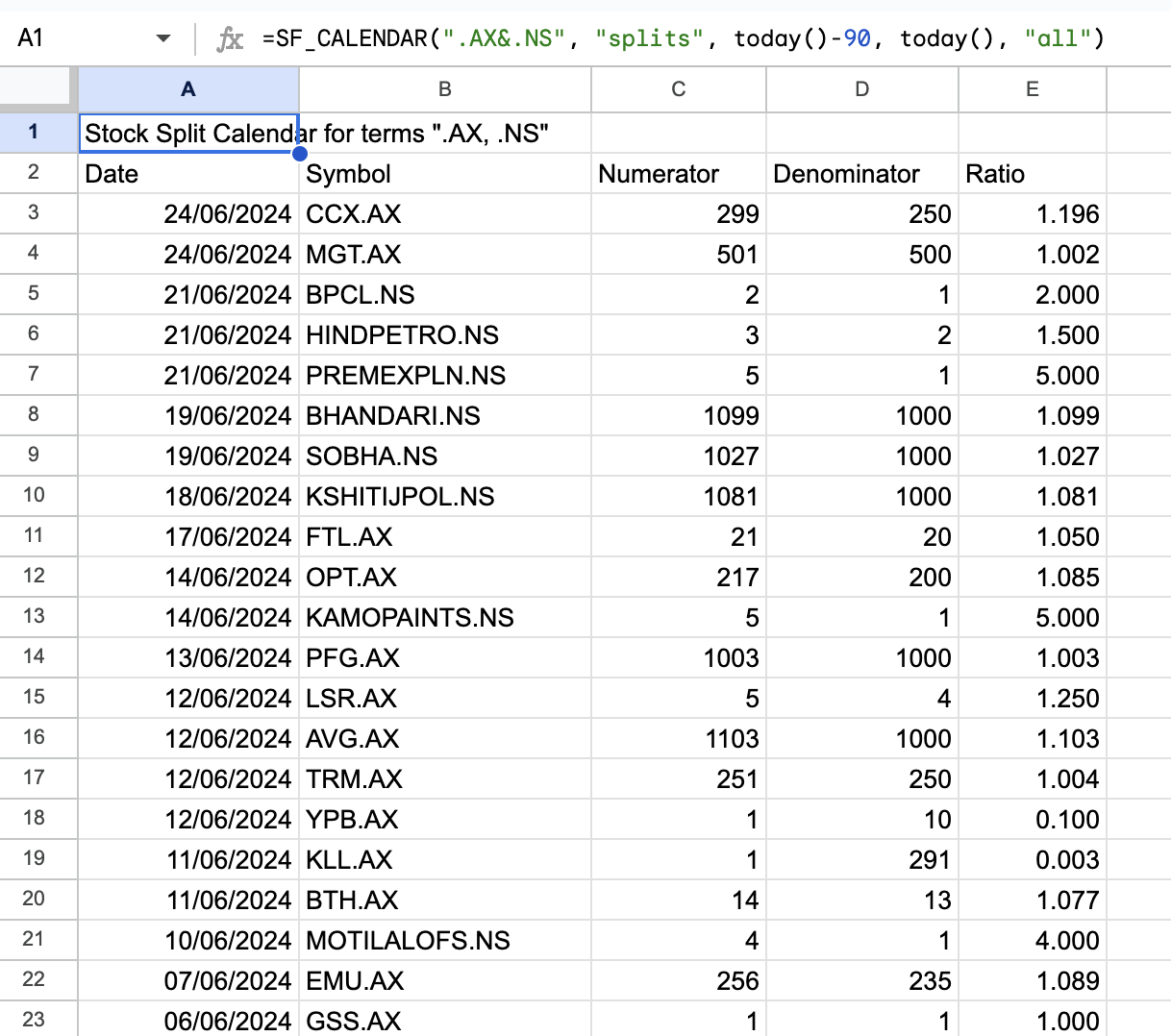
Example 3 - Earnings Calendar, selected metrics, next 1 month, filter for NSE
=SF_CALENDAR(".NS", "earnings", today(), today()+30, "date&symbol&time&fiscalDateEnding")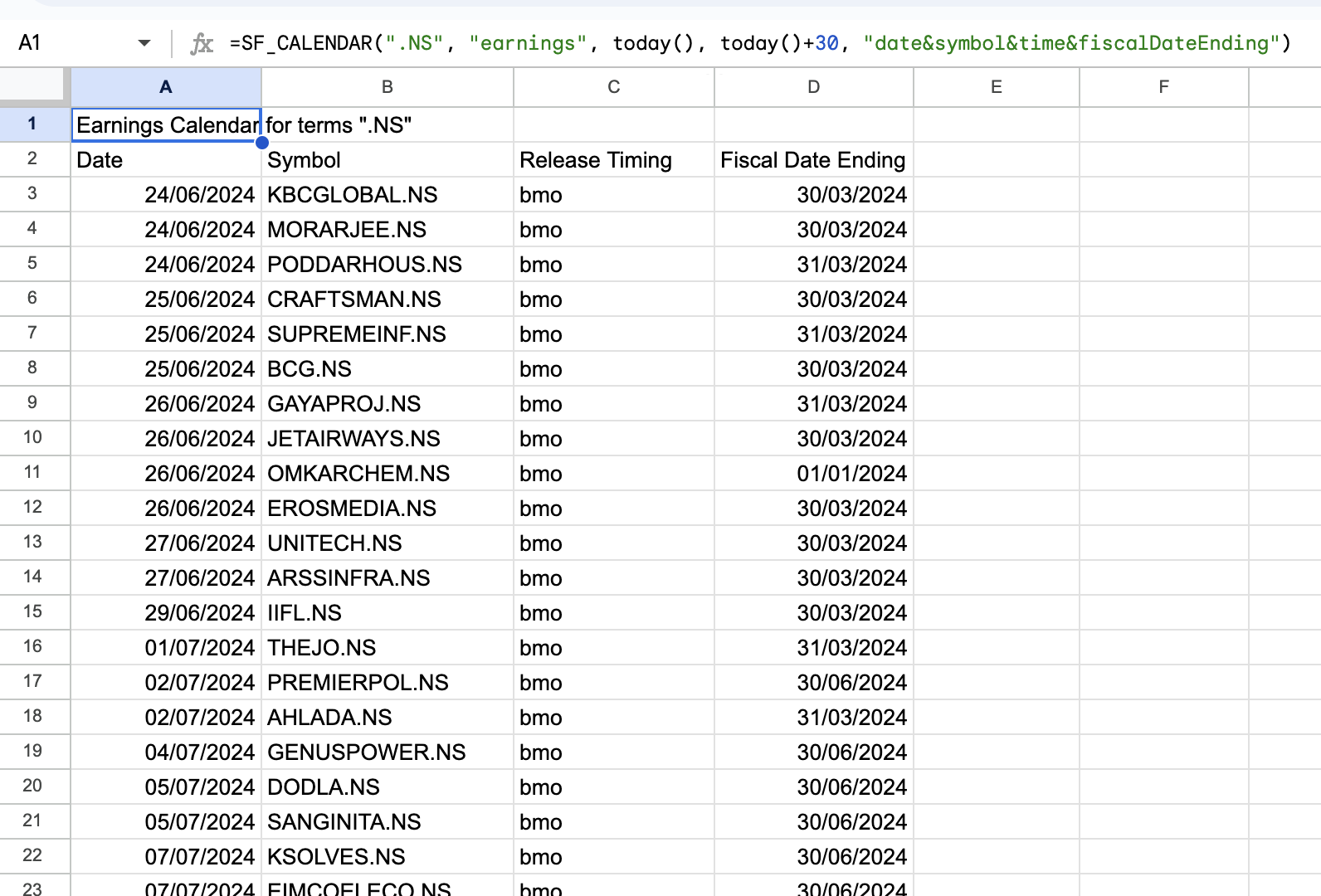
Example 4 - Economic Calendar, next 2 weeks, selected metrics, filtering for countries "US" and "UK"
=SF_CALENDAR("US&UK", "economic", today(), today()+14, "date&country&event¤cy&impact")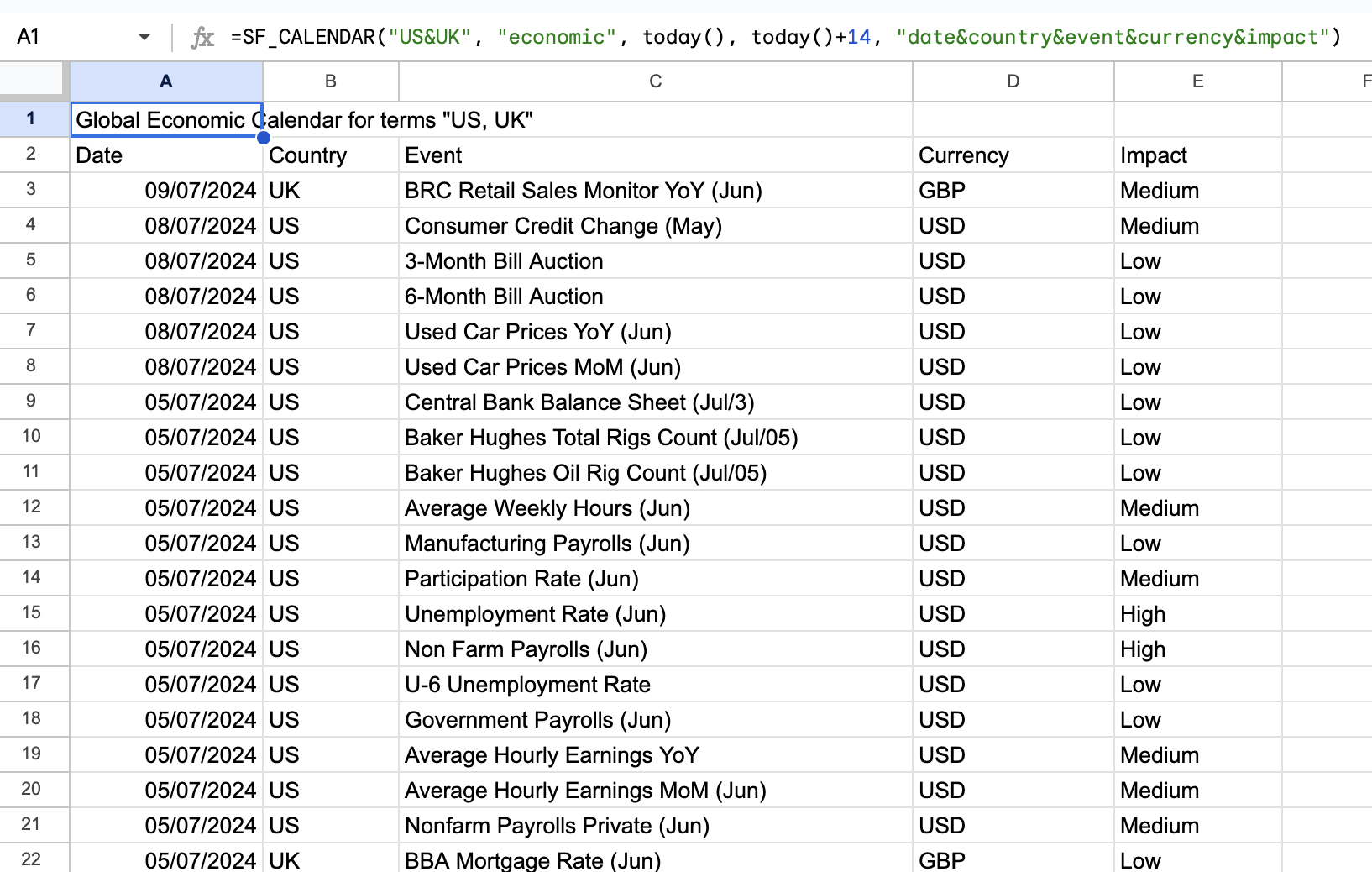
Per-calendar guides
For detailed examples and extended metric lists for each calendar type, see the dedicated articles: